Showing posts with label Strategy. Show all posts

Tuesday, June 12, 2012

Wicd Wireless, Port Forwarding

v 0.2
12 Jun 12

Xfce Wireless

I installed Debian Wheezy onto my old IBM T31 laptop this morning.  The netinstall via a wireless network went smoothly.  I installed Xfce rather than Gnome, so the Wireless network manager was Wicd.  When I booted up, no wireless network was found.  Dead.  It should have detected at least two networks.

The fix was amazingly simple.  Open the Wicd window, Options, General.  There is an entry there for the wired "eth0".  In the Wireless entry, enter "wlan0".  

It works.

Port Forwarding and Blocked Ports

I have been driven to distraction the last week or so trying to port forward port 80 to allow some friends to play with a demonstration I've set up.  I blamed my Apple Time Capsule, particularly when I saw so many complaints that people were unable to port forward.  I bought another router, and then found THAT would not forward port 80.  Grrrrr.

I rang up my ISP over the matter and they said that they did not block port 80.  (yeah ... riiigghhhhttt)

They do.

So, I set the demo server to work on port 2000 and forwarded it from the router.

VICTORY!!

Another expensive lesson.  But I did bumble my way through it.


Later .......

Tuesday, May 29, 2012

The Law and TLD, The Cloud and Home Servers

v 0.22
12 Jun 12

I've recently had a few disparate threads of the Cosmos come together to lead me down a new line of interest with my Computing.  It all started a few months ago when I was reading my daily dose of "Slashdot" and has finished with me starting to set up a Home Server for myself.

The Law

Whilst the Slashdot article was about the US Government seeking the extradition of a UK Student, the issue was their assertion that all ".com , .net , .org " etc domain names were subject to US Law, no matter where the servers or businesses or organisations were located.  Now, whilst the current actions involve copyright infringement allegations, I can see that this could easily be extended to other areas of the law,  were it convenient for those in power.  A link to a relevent article:

http://www.theinquirer.net/inquirer/news/2083906/claims-com-net-websites-jurisdiction

Whether the legalities of this assertion by the US Government are shown to be valid or not, what it means (to me, anyway) is that if you host a website with one of these top level domains, then you potentially must comply with US Law.  You may, for example, run a business in one particular country using such a website, so not only do you need to comply with your own country's laws, you must also comply with those of the US.  Some (legitimate) Canadian businesses are already discovering this.

The lesson I've taken away from this is that if I need a business or other serious website, then a domain name from maybe my own country would be a better decision.

The Cloud

The Cloud is certainly a convenient place to store data, and in all normal circumstances, your data should be quite safe - Google has just received security certification for its services.  Dropbox, whilst convenient, doesn't store your data encrypted, whilst SpiderOak does.  If you are paranoid and want to use Cloud storage, then SpiderOak would be great.  Or encrypt your data on ANY Cloud device.

Of course the problem comes when your provider has their server seized by whichever Law Enforcement agency, because of some other entity which also uses that server ........

Home Servers

It almost feels to me that the concept of keeping your own data is making a comeback - perhaps not for all, but "the Cloud" is not necessarily the best move in all circumstances.  There are some really interesting Web applications that can be hosted on your own server.  Several I'm fascinated with are "OwnCloud", "OnEye", "Diaspora" and "Citadel".  I easily set up "OnEye" on a test virtual server at home, and did the same with "Citadel".

Routers

When I tried to demonstrate Citadel to an organisation I was a member of though, I found I couldn't get my router (Apple Time Capsule) to open any ports to allow this.  Googling for a solution gained me nothing other than finding more than a few others with the same problem and the best I could find was that it was a flaw in the firmware.

Bad Time Capsule .... Bad Bad Time Capsule.

So out of that, I thought maybe time for a "proper" router.  I'd recently seen an interesting "Category5TV" Episode 166 dealing with DD-WRT firmware and a Netgear router.  In the end, I chose to get a WNDR 3700 Netgear - for it's firmware flashing capabilities and the wireless range it offered.

* Subsequently I found that my ISP was blocking some ports - it wasn't helped by them denying it when I called to see if this was in fact happening.  Unfortunately I had to fall back on detective work to discover this (and then have my Nephew say "yes, of course they do, didn't you know?").  So Ultimately, I could have saved my money and continued with the Time Capsule by using unblocked ports.  Sigh

Server Hardware

As I mentioned before, I'd been playing with servers within Virtualbox Virtual Machines on my Desktop - now whilst at the time I knew my desktop wasn't the best machine to use as a server if only for its power consumption, I was prepared to live with this for a short while, however once I started thinking about the router problem, my mind drifted back a week or so to when Dell sent me an advertisement for what I considered to be a cheap desktop that would be suitable.  Of course, I wouldn't be buying the Dell because I had plenty of screens and keyboards already and saw no point in buying anymore, not to mention that I had no use for Windows on my server.  But research into the components did lead me to an interesting setup.

Motherboard   Asus P8H61-M LX Rev 3
CPU                Intel i-3 2120
Memory          8 gig
HDD               Western Digital 2 TB Caviar Green
DVD drive

This machine is about 10 times as fast as a P4 3.0 box I already have and uses less power.  How much less?   Testing I've seen indicates the machine should use between 50 and 100 watts under most conditions.  Using this as a server rather than one of the previous two I've mentioned would be a minimum saving of 200 watts.  This works out at roughly 5kwhr per day or over $1 per day where I live.  It would pay for itself in electricity charges in a year.

Server Software

Having worked out the hardware, I'm planning on replacing an old P4 desktop that is used by the family.  I intend having it used as a desktop, with Virtualbox providing servers in virtual machines.

Debian "Wheezy"  64bit
Xfce Desktop
Virtualbox

At the moment, I intend setting up one or two virtual machines as Citadel servers - one for the family and one for my organisation to evaluate.  After that, well there are a number of interesting projects that are available, even within the Debian repositories.

I think that is enough for now ... I shall report back with my installation adventures.


Later ...........

Tuesday, May 22, 2012

Citadel Groupware - Some Possibilities

v 0.3
23 May 12

I was thinking this morning that Citadel provides the possibility of some really interesting implementations.  It is easy to install (especially in Debian), and they provide up-to-date debs from their own repository.  You can even have it running in a Virtualbox instance.

I strongly recommend you install Citadel via a Debian install and use the Citadel repository.  I was using the Wheezy version which had severe flaws in Wiki and File rooms - fixed when I updated to the latest version.

Don't like how it looks?  Easy .. just adjust the CSS and have it look any way you like.  They give you the page structure on the website and a CSS example to use and modify.

It is easy to set up a secure (you get https out of the box) network of Citadel servers (don't forget, this is not a client, it is a series of SERVERS that you can view as localhost on your web browser on the same computer if you like) and have your own secure independent email network - share projects, share files all over https.  Use a dynamic DNS provider and you can have a mobile node that can make connection from a hotel and the network sharing is up and running again.

These are just a few thoughts, however I'm sure there are more uses.

In case you are wondering what I'm saying about an independent email network...  Out of he box, Citadel will send email to users of the independent system based on their username.  Consequently, if you simply connect two Citadel servers together, then you can share email between the servers directly within that network.  Add connect via https and you are up and away .....

Finally, what servers are included in Citadel?  Here is what I've worked out so far:
  • Web server (webcit)  (http  https)
  • Mail Server (SMTP POP3 IMAP)
  • Calendar Server
  • Jabber (IM) Server (XMPP)

Later....

Sunday, May 20, 2012

Citadel Groupware

 v 0.22
24 May 12

Citadel is different - on first glance, it looks like a BBS with aspirations above its station.  I’ve had a love/hate relationship with this Groupware from the first time I saw it in the Debian repository and read about it.  

It has history … extensive history.  It grew out of the old BBS systems of Dial-up modem times, and still has a text mode that replicates that, although normal interaction is through a web browser and the “Webcit” server application.

Citadel looks, at first, a little dated and I’ve found user documentation a little sparse, however I’m slowly “getting” it and starting to really like it.  One thing I especially like is that it has several security advantages over other packages, notably immunity to PHP and SQL attacks.  It has its own inbuilt servers and it does not use PHP or MySQL.

So, how does Citadel qualify for the compliments I’ve seen about it?

Whilst it may seem a little “clunky” at first glance (it can be modified), its power lies in its simplicity of concept and gentle learning curve.  It is easy to set up, and you can start out with a very simple configuration and expand as you become familiar with how to use it.  It is like being given a pile of different lego blocks and discovering how to assemble them into ever more complex objects.

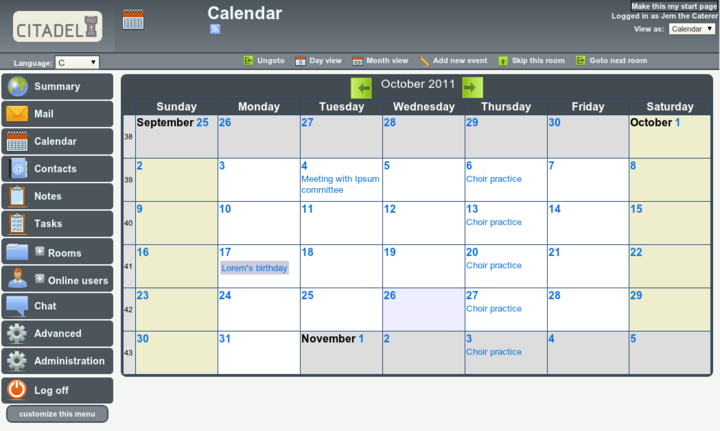
It is probably time for a screenshot (from the Citadel website), and then a discussion of how the setup works.  Once logged in to the application, this is how it generally looks, with a menu on the left and the subject of whatever you have selected in the main window.  Note:
  • login and viewing details in the top right
  • selection options for the current viewing window along the top menu-bar


Of the “Menu Selection Buttons” on the left, the private “rooms” for each user are:
  • Mail
  • Calendar
  • Contacts
  • Notes
  • Tasks
 

  • The “ +Rooms “ selection expands to the current “room” matrix.  These can be public or private, hidden or password protected, as determined when they are created.
  • “Advanced” is allocated on a per-user basis, depending on what permissions a user gets.
  • “Administration” is, obviously, allocated to an Administrator.
  • The menu is tailored to each user and setup.

At its core, Citadel is an old-style BBS.  Forums use the paradigm of “Floors and Rooms” of a building.  Each “Floor” has a broad subject, with each room being a more specific subject.  Where this differs from a standard BBS is that each room can take several forms.  The “room” could be a standard message topic discussion, or it could be a task list or a Blog.  So, in the case of a company project, there could be one floor named “Project” with separate rooms for message discussions, task lists, a blog talking of progress on issues and even perhaps a calendar.

Communication.  
  • Out of the box, Citadel offers email between registered users, with only the username required.  After it is configured, then conventional email is available.
  • There is an IM facility between logged in members.  There is more. Put a “Jabber” client such as Pidgin on your desktop and tell it about Citadel, and Citadel can act as a Jabber server connecting users.

Office Documents
  • Blog and Wikis.  Any room can be configured to act as it says.  I have to say though that I’ve yet to get the Wiki feature to work as I’d like (upgrade to 8.11 fixed that problem).
  • Calendars and Notes and Tasklists.  As it says, you can also nominate any room for these.  The “Notes” are sticky notes, and the Tasklists, while basic, can be categorised quite finely.

Networking
  • Citadel servers can be configured to network together simply by telling them about each other.  Users, rooms etc can be shared and a quite complex “social network” of sorts can be constructed.  These building blocks can link together to construct quite a complex system.  Impressive.

One final thing for the moment.  FLOSS Weekly Episode 209 is all about Citadel.  Worth the look.


Later...

Saturday, February 4, 2012

Debian - Netinstall + Window Manager

v 0.4.7

Subsequent to my last post about the Netinstall as a console system, I experimented with installing Xorg and a Window Manger.

" aptitude install xserver-xorg wdm wmaker xterm "

as I found when I did the initial install, xterm was not installed and this made it all very difficult.

18 meg unpacked ... reboot and works like a charm.  Now, having given the example, you could insert gdm3 or slim instead of wdm and fluxbox or whatever instead of wmaker.  I simply did this as an experiment.

Since we are talking about Window Maker as a manager, here is a description as to how to configure it ...

http://maketecheasier.com/create-a-great-window-maker-desktop/2009/02/14


Later .....

Update Monday 6 Feb (just after shaking my head in wonder at how you get to the Superbowl, then get caught out putting 12 men on the field .....)

I also installed Fluxbox and Fvwm.  Both seems to have improved default values these days - but I also installed Conky from the repositories.

Netinstall + X + Window manager (Fvwm) + conky .... under 35 meg memory useage!  And this from a standard Debian install - just choosing what you run.

Others (approx):
  • Fvwm   34 meg
  • Fluxbox  32 meg
  • Window Maker  28 meg
  • Openbox-Session 24 meg
  • Add 5 meg for each terminal
By way of comparison, the Wheezy Xfce install I did previously uses just on 92mb.

    Later....

    Friday, June 17, 2011

    Debian Squeeze for My Parents - Useability - Pt4

    v 0.2

    Over the previous three posts on this subject, I've been describing how and why I set up my Parent's home computer with Debian as an alternative for their use.  I have to emphasise that at the moment, it is an alternative, since there is a lot they like to do on Windows that time just did not allow me to show them.  My main aim was to introduce the alternative and to show them how to use it for electronic banking.  I pointed out how their current setup had major weaknesses, particularly that the anti-virus had not been updated in months, and that even though the Gnome desktop may look a little different to Windows, it wasn't that different and did basically the same things.

    It is always interesting when you introduce someone who has relatively limited experience with desktop computers, to a new system that, to myself, is just a variation, but to them is completely new.  Having said that, as the new system is used then familiarity helps.

    • The first thing is to explain basic concepts - the internet "cloud" of machines where websites and banks exist, the computer, and the web browser.  I found these being confused and if someone doesn't have a vision of how the pieces fit together, it can be a very difficult experience.
    • Operating systems is another problem people have.  I have been surprised how many people just cannot understand that Windows is not needed to run a computer.  I generally compare this to a large house needing a Butler to manage.  The Butler runs the house and employees, greets guests and generally makes sure everything is running well.  I explain different operating systems as different Butlers who each speak a different native language when running the house.  Some are bi-lingual, others not so.
    • Web browsers caused some confusion earlier on, since not having Internet Explorer and "Favourites" made it initially seem that this would not work, however explaining that IE and Firefox/Iceweasel were just two products that did the same job helped.  And relating that "Favourites" and "Bookmarks" really did the same thing helped also.
    Fortunately as far as linux useability goes, the desktop metaphor is easily adapted to no matter which one. 

    This post, I wanted to write about a few of the things I observed with useability, something we don't normally get to see with people trying to work at new concepts and understand things that are simple to the younger of us, but not to the elderly.


    Later ..............

    Thursday, June 16, 2011

    Debian Squeeze for My Parents - Strategy - Pt1

    v 0.2

    My Parents are getting on in years, and with me living on the other side of the country to them, I don't get to visit perhaps as often as we all think we should.  So, since I had a couple of weeks free recently, I jumped on an aircraft and paid a visit for a week.

    One of the items on my "list of things to do" was to see what I could do to improve their computing experience - particularly in the areas of security and to make their use of the machine as a communication device a more pleasant experience.  What I would have liked to have done is to just buy them an iMac, however I knew they would have regarded that as an extravagance and would have resisted because it was "different".  My Brother-in-law had been helping them as he could, however he was "time-poor" and couldn't devote all the time that was probably needed to teach them what they needed to know, and I certainly didn't want to get in his way since he was there and I wasn't.

    I remember the desktop as being an early Pentium 4 machine with not much memory, and I'd been told that there had been a bit more memory put in, so I thought I'd just take stock of what was there.  When I fired the machine up, my first thought was .. this is rather snappy!  It was a newer machine than I'd remembered and quite nice for what it was:
    • 15inch LCD Screen
    • Pentium 4 3.2 gig
    • 1 gig memory
    • DVD RW
    • FDD
    • 80 gig HDD
    • Windows XP Home
    Internet access was using Internet Explorer through a router, and I found that the virus protection hadn't been updated in a few months.  For me, the only good thing here was that the machine was behind a router.  My personal, biased opinion is that you have to be nuts to use IE on a regular basis, however on a more rational level, Windows XP is rapidly becoming outdated, is inherently less secure than current systems, and can not run the latest Internet Explorer browser.  Outdated virus protection certainly didn't help.

    Aha! I thought, there may be a zero-cost way to improve things here.  Importantly though, in installing a new system on the machine, it is important that Windows still boots up by default.  Forcing them into this "new fangled system" just gets the ire up and works against what you want to achieve.

    After thinking about it all, I decided to use the last 30 gig of the HDD for Debian, and setting it up so that the system defaulted to Windows.

    Next, the installation.


    Later ..........

    Tuesday, June 7, 2011

    Bitcoin as an Electronic Currency

    v 0.3.5

    Since I started posting about Bitcoin, the traffic through this Blog as increased substantially.  Obviously this reflects the interest in Bitcoin, but I can't help thinking it is there for the wrong reasons.  I could almost compare it to what I've read of people's reactions to Gold Rush Fever, as it were.

    Now, a Gold Rush is famous for making people rich, however all too often those being made rich were the merchants, rather than the prospectors, and it is looking the same today.  My most popular page, by far, is the description I wrote as to how to set up solo mining on Windows 7 and an ATI 6970 video card.  Yes, you will make a couple of hundred bitcoins a year with a medium setup, but that will not make you rich.  I'd classify it more as an entertaining distraction.

    Another thing that concerns me is the rapid rise in the value of a bitcoin.  That has all the hallmarks of a bubble, and people are going to get burnt.  Hoarding the bitcoins for speculation CAN work, but can also burn you seriously.  If bitcoins become common as a currency then yes, over time they will inevitably rise in value, however once people start hoarding them, the "Bitcoin Landscape" becomes distorted and the instability starts again.  This instability is the opposite of what people are looking for in a currency.

    Now, where does Bitcoin fit in to the money definitions?  If you read on Wikipedia as they talk of "Fiat Money" and "Comodity Money", then Bitcoin has characteristics of both.  It seems to be closest to a Banknote in definition, which then means that the stability of the Bitcoin network and encryption are the make or break characteristics.

    Now, I readily admit I know little about the Bitcoin setup and I don't have a finance background, however it seems to me that Bitcoin, whilst a good concept, and apparently well thought out for the moment, still has a way to go before it can be considered a success.  It is essential that its network integrity is maintained, and it is readily apparent that its encryption needs to keep pace with the times.  What is unbreakable today is not tomorrow.  It needs continual work to stay secure and trustworthy.

    So to those who think this is the magic bullet that will solve their money worries - no it is not.  You can make a substantial amount of money from Bitcoin, but only by working at the business like any other.  Yes, speculation MIGHT make you money, but more probably it will lose your money.

    So there you have it, Bitcoin MIGHT work but it is early days yet and lots of holes to jump over ....


    Later ..

    Update:
    Here is a discussion on Slashdot about Bitcoin, including just what I was concerned about above .. "the Bubble".  It appears that there was perhaps a bit of manipulation of the value over the last couple of weeks ..
    Slashdot on Bitcoin

    Update 2:
    Bitcoin Price Crashes (Slashdot)

    Monday, January 10, 2011

    Server - Thoughts

    v0.1

    I've been finding my little eeepc server rather entertaining, and I'm learning a lot.

    SSH

    I can log in to the server from the local network and from the internet using my IP address, having port-forwarded the router ports.  Using the Secure Copy function of SSH I'm looking into copying files between machines.

    IP Address

    Dynamic DNS providers - the free accounts seem to expire if you don't use them for  a month or so, so that is a consideration.  If you don't turn your router off, then your IP address should stay the same and you can use that.

    Opera Unite

    Opera has what is effectively a free dynamic dns service together with FTP, Web servers, Media streaming, Web Cam broadcast etc through their web browser than I'm going to have a better look at.  It turns your computer into a server with no special configuration.  May well serve for what most people would find useful.

    VNC

    Definitely a function I need to investigate.  I did have a play with it a few months ago, but now is the time to get it resurected.


    Some more later ........

    Saturday, January 8, 2011

    Text - Groff and Mom

    v 0.3

    I've always had a partiality towards producing documents using text markup.  It has been limited in the past towards having a play writing my on personalised "Man" pages for my Linux machine, or writing html using markup (which drives my Nephew nuts because he likes Dreamweaver).  It rubs off onto my Daughter as well, since she prefers markup for her html coding as well.  Perhaps the fact that she is a Script-writer has something to do with it.

    I was interested to see that Groff is included in my Cygwin install (unsurprisingly) so I started to wonder if it was a useful tool for writing letters and other documents.  If you have a useful template, then just changing some of the content is far easier than opening a Word Processor and starting afresh - or even finding that letter that you wrote some time ago to change a few things.  Of course, that the hardware needs of such a system are far less than the requirements of a Word Processor come into play.

    The first thing I stumbled on was this linxgazette article on Groff and Mom.  So then I went to the Mom Homepage and started reading further.  Despite Mom being included in Groff (and it is, in Cygwin as well) I downloaded the latest version of Mom to have a look.  Within the file there is the documentation and numerous examples, as well as the macro definition file " om.tmac ".  There is an " install " file to read, however in the end, if you put the " om.tmac " file in the home directory, all should be well (though I haven't tried that yet).

    The moment of truth.  I opened a Cygwin command line window, which, since I've set the HOME environment variable, opened in my HOME directory.  I'm not going to go into the logic of the Unix command line here - please refer elsewhere - the Rute User Tutorial on the links page is an excellent place to start.  Using one of the sample " mom " files that came with the Mom download:

    groff -mom letter.mom > letter.ps

    And low and behold, a postscript file appeared.  The documentation had a slightly different syntax to send the file to the printer, so I tried that, even though my default printer is not postscript.

    groff -mom -Tps letter.mom | lpr

    The raw postscript printed fine on my default printer, so even though I didn't have the "beautiful" result at this stage, I did know that the command line worked and sent files to the printer.

    Windows does not have the capabilities to read postscript files in a viewer that other operating systems do, so the next step is to get Ghostscript, the free Postscript interpreter and viewer.  The presentation of postscript files is a little problematical, depending on the font that is used, however the printed article seems to work fine.

    There is a script included in Ghostscript that you can use to convert the file to a "pdf" file.

    ps2pdf letter.ps > letter.pdf

    NOW you can open the letter in a pdf viewer and print it from there.  You'll notice that the clarity of the text in pdf format is MUCH better than the postscript viewer.

    All you have to do now is read the documentation, and have a play.  You are up and running with Mom!!

    Update 17th Jan

    Other Macro Packages

    The other two macro packages I could find documentation for were the "ms" and "me" packages showing how to use them.  See the Links page.


    Using Emacs to Edit Groff

    Emacs has a built in " nroff " mode.  To activate it, either issue issue the command via:

    M-x nroff-mode

    or making the first line of your Groff source document:

    \" -*- mode:nroff -*-

    \"  is the comment in Groff, so the mode instruction line will remain invisible.  Using Nroff mode, all macros will be highlighted for easier editing.


    Later ....

    Friday, January 7, 2011

    Power and the Atom

    v0.1

    As the number of computers is increasing in households, a few months ago I started thinking about the power consumption issues.  Until now I've paid scant attention to the electricity costs of the Computer in the corner and have been enthusiastic in recycling older machines for people's use.

    Last time the electricity bill came in, I had a look at the cost - 25c per KWhr.

    My nephew has just constructed a Server to use as a media centre.  It is powered by an Atom D525 cpu, and has a terrabyte HDD with nVidia ION graphics, as well as more interface ports than you can poke a stick at.  It draws less than 50w at maximum stretch playing 1080p HD Video.

    Note:  Asus produce a similar product called the "eee Box".

    An older desktop I use is a Pentium 4 3.0 machine with two HDD of 160 gig and 500 gig and an nVidia 6800GT video card.  This was my gaming machine for IL2, a combat flight simulator until a couple of years ago. Now before going away to work it out, I guess that this machine would draw about 350w at full steam.  I know that I did blow up a 280w power supply at one stage on it.  I'm breaking it down as:

    • CPU 65w (subsequently found to be 80w)
    • HDD 50w ea - 100w
    • Motherboard - 20w (probably too modest)
    • Video Card - 150w (really 185w)
    So, 350 w to 380 w is the ballpark consumption of this machine.

    I found it was difficult to get the power consumption discrepancy below 200w (even with a pretend lower powered video), which surprised me because I've always thought of it as about a 100w saving.  Based on all that, there is about a $400 per year saving in electricity (assuming the machines were left on all the time) using the Atom based machine, which has more than adequate video capabilities for all but demanding 3d games, and more computing power than the older machine, even more than matching the faster P4 3.8.  After 2 years you have a free system and the savings mount after that.

    It all made me think about how much computing power you really DO need these days.  Do you REALLY need that Intel i7 machine?  

    Some Performance / Power links


    Later ......

    Thursday, December 16, 2010

    Strategy - Goals, Tools, Riffs

    The title for this post is shamelessly taken from an article written about 10 years ago by Steve Litt at Troubleshooters.com .  The article in question is a part of his online magazine series and I find it completely brilliant in explaining an effective approach to achieving high productivity.  I guess I should show you the article first:


    The lesson is not a new one, and there are many sayings that effectively echo the sentiments, such as "Jack of all trades and master of none" however the concept illustrated here is practical and shows those who hear it how to be successful when all others are not.

    There is another article in this issue of Steve's that I love as well


    I especially love the section titled "There is None as Blind as He Who Will Not See" .  Hard won wisdom.

    Finally there is an article he wrote about the recession of the early '90s when people were being laid off and jobs were being outsourced to South Asia.  The link points to only a sub-section of the complete magazine which has so much to offer.


    There is a common thread through all these articles, however I'll leave it to you to work out what they are.  In any endevour, it is not necessarily the spectacular parts of it that will give you the most reward.

    One subset of this that I've taken on board is that in many professions there is a library of routines that you need to know well.  For me that is particularly so - I fly aeroplanes for a day/night job (mostly night).  There are a number of sequences that you need to remember and be able to do without thinking:

    • Go-Around
    • Loss of Cabin Pressure
    • Engine Fire

    are just three, but you get the drift.

    Have a good look at Steve's site.  I think it is great and has so much to offer - but only to those of us that think carefully about things.


    later .......