Showing posts with label office. Show all posts

Monday, September 18, 2023

Life Skills - Things That Last - LibreOffice

PreAmble

 I recently saw a couple of youtube videos that changed the way I look at things .. hopefully this will be the first of a few posts that explain some things and maybe one or two people will benefit.

Intro

When I was in my early teens, my Mother taught me to touch type (she was a secretarial teacher). She also tried to teach me shorthand which I never really cottoned on to, though I wish I had.

Never in my wildest imaginings did I realise how valuable the skill of using a keyboard was going to be. Fast forward to today and I still remember that lesson. Learn something worthwhile and you have it for life.

Things Change

So how does that relate to things today? Well for one thing document formats change so frequently that if you author something in for example MSWorks .. well in a few years it is not able to be read. This is a real worry these days. If you have an MSWord document from a while ago (yes you probably have to be old to appreciate this) .. well MSWord cannot read it.

I have many documents in MSWorks .. the only way I can read them is with LibreOffice.

It is called Vendor Lock In ... or alternatively obsolesence.

Another problem (apologies for using MSWord as the whipping boy) is that these proprietary products change - MSWord is certainly guilty of that - you get a new version and then you have to learn all over again.

So.

Are there any quality, free authoring products that you can rely on forever?

Yes. Lots.

LibreOffice

First out of the gate for the curious is "LibreOffice". LibreOffice is actively developed, is free and available for all platforms you are ever likely to use. It reads and writes more document formats than MSOffice and will be there forever, still able to write those document formats.

Why would you NOT use LibreOffice as your suite?

Here is the Wikipedia entry for it ....

https://en.wikipedia.org/wiki/LibreOffice

Things That are Worthwhile

Here is a list I'll be talking about in future posts.

Applications:
Emacs (orgmode, the killer app)
Vim (vimwiki - a second brain)
Obsidian (another second brain)

Markup Formats
Groff
LaTeX
Markdown
AsciiDoc

Web Apps
Trello
Simplenote

Video conference
Jitsi


Tuesday, May 22, 2012

Citadel Groupware - Some Possibilities

v 0.3
23 May 12

I was thinking this morning that Citadel provides the possibility of some really interesting implementations.  It is easy to install (especially in Debian), and they provide up-to-date debs from their own repository.  You can even have it running in a Virtualbox instance.

I strongly recommend you install Citadel via a Debian install and use the Citadel repository.  I was using the Wheezy version which had severe flaws in Wiki and File rooms - fixed when I updated to the latest version.

Don't like how it looks?  Easy .. just adjust the CSS and have it look any way you like.  They give you the page structure on the website and a CSS example to use and modify.

It is easy to set up a secure (you get https out of the box) network of Citadel servers (don't forget, this is not a client, it is a series of SERVERS that you can view as localhost on your web browser on the same computer if you like) and have your own secure independent email network - share projects, share files all over https.  Use a dynamic DNS provider and you can have a mobile node that can make connection from a hotel and the network sharing is up and running again.

These are just a few thoughts, however I'm sure there are more uses.

In case you are wondering what I'm saying about an independent email network...  Out of he box, Citadel will send email to users of the independent system based on their username.  Consequently, if you simply connect two Citadel servers together, then you can share email between the servers directly within that network.  Add connect via https and you are up and away .....

Finally, what servers are included in Citadel?  Here is what I've worked out so far:
  • Web server (webcit)  (http  https)
  • Mail Server (SMTP POP3 IMAP)
  • Calendar Server
  • Jabber (IM) Server (XMPP)

Later....

Sunday, May 20, 2012

Citadel Groupware

 v 0.22
24 May 12

Citadel is different - on first glance, it looks like a BBS with aspirations above its station.  I’ve had a love/hate relationship with this Groupware from the first time I saw it in the Debian repository and read about it.  

It has history … extensive history.  It grew out of the old BBS systems of Dial-up modem times, and still has a text mode that replicates that, although normal interaction is through a web browser and the “Webcit” server application.

Citadel looks, at first, a little dated and I’ve found user documentation a little sparse, however I’m slowly “getting” it and starting to really like it.  One thing I especially like is that it has several security advantages over other packages, notably immunity to PHP and SQL attacks.  It has its own inbuilt servers and it does not use PHP or MySQL.

So, how does Citadel qualify for the compliments I’ve seen about it?

Whilst it may seem a little “clunky” at first glance (it can be modified), its power lies in its simplicity of concept and gentle learning curve.  It is easy to set up, and you can start out with a very simple configuration and expand as you become familiar with how to use it.  It is like being given a pile of different lego blocks and discovering how to assemble them into ever more complex objects.

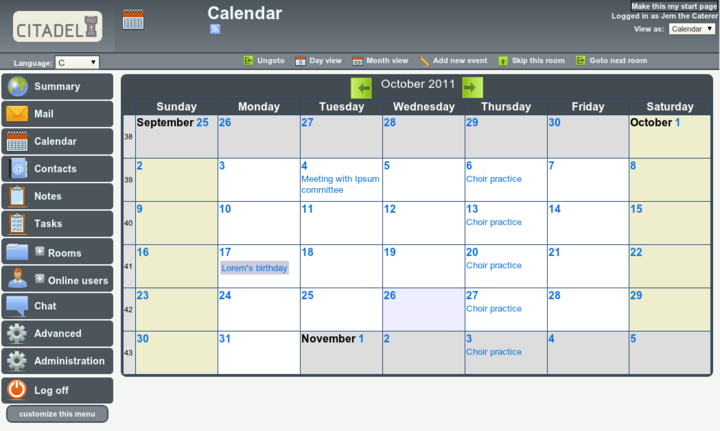
It is probably time for a screenshot (from the Citadel website), and then a discussion of how the setup works.  Once logged in to the application, this is how it generally looks, with a menu on the left and the subject of whatever you have selected in the main window.  Note:
  • login and viewing details in the top right
  • selection options for the current viewing window along the top menu-bar


Of the “Menu Selection Buttons” on the left, the private “rooms” for each user are:
  • Mail
  • Calendar
  • Contacts
  • Notes
  • Tasks
 

  • The “ +Rooms “ selection expands to the current “room” matrix.  These can be public or private, hidden or password protected, as determined when they are created.
  • “Advanced” is allocated on a per-user basis, depending on what permissions a user gets.
  • “Administration” is, obviously, allocated to an Administrator.
  • The menu is tailored to each user and setup.

At its core, Citadel is an old-style BBS.  Forums use the paradigm of “Floors and Rooms” of a building.  Each “Floor” has a broad subject, with each room being a more specific subject.  Where this differs from a standard BBS is that each room can take several forms.  The “room” could be a standard message topic discussion, or it could be a task list or a Blog.  So, in the case of a company project, there could be one floor named “Project” with separate rooms for message discussions, task lists, a blog talking of progress on issues and even perhaps a calendar.

Communication.  
  • Out of the box, Citadel offers email between registered users, with only the username required.  After it is configured, then conventional email is available.
  • There is an IM facility between logged in members.  There is more. Put a “Jabber” client such as Pidgin on your desktop and tell it about Citadel, and Citadel can act as a Jabber server connecting users.

Office Documents
  • Blog and Wikis.  Any room can be configured to act as it says.  I have to say though that I’ve yet to get the Wiki feature to work as I’d like (upgrade to 8.11 fixed that problem).
  • Calendars and Notes and Tasklists.  As it says, you can also nominate any room for these.  The “Notes” are sticky notes, and the Tasklists, while basic, can be categorised quite finely.

Networking
  • Citadel servers can be configured to network together simply by telling them about each other.  Users, rooms etc can be shared and a quite complex “social network” of sorts can be constructed.  These building blocks can link together to construct quite a complex system.  Impressive.

One final thing for the moment.  FLOSS Weekly Episode 209 is all about Citadel.  Worth the look.


Later...

Friday, April 20, 2012

Stores Filing System - Considerations

v 0.21

When I'm not away on my "real" job, I spend time with a group called "HARS" - the "Historical Aircraft Restoration Society".  One of the projects there is to repair the damage on the replica "Southern Cross" Fokker Tri-Motor (the original is safely housed in a display at Brisbane Airport).  I was asked "Can you come up with a program to allow us to keep track of the parts here - BUT - it has to be SIMPLE!!

No problems I thought - I can just use LibreOffice or a simple database program .. but as I found, it is not quite as simple as that.  Simple programs are not simple.

The first obstacle is that if you use a database program of whatever kind on a single computer, the stores system is useless if you don't have THAT computer available.  Sharing the database file is a kludge that rapidly becomes really scary.

Next, I talked to the guys that looked after the servers there.  They immediately told me that they already had a stores database system there - would I like to look at it and get it going?  Absolutely!  Unfortunately, after a LOT of reading and thinking about it, I realised that this stores system, whilst available over a network was designed for companies that had dedicated and trained people who used it all the time.  A 70 year old Aircraft Engineer who had spent his career with paper and files would not have a hope of walking up to this system and doing what he wanted - especially since he was here to play with aircraft for fun, not learn how to use a complex computer program.  So after a lot of time trying to find out what I'd missed about the program, I realised I hadn't missed anything and that it was quite unsuitable for what we needed.

Perhaps I could get them to install PostgreSQL as a relational database manager and I could then write something to connect to it in LibreOffice, or a scripting language or whatever ...... I was met with looks of suspicion (which I can understand, given some of the "offers" of assistance these people have had in the past).  More street Cred needed before I proceed down that path.

After some thinking, I finally settled on trying a system using Google Docs and Google Script.  The more I looked at it, the better it seemed for what I want.  It was in "The Cloud", it could be accessed from anywhere and on any Internet enabled device.  Now to work out how to implement it.


Later ............

Monday, December 13, 2010

Finding Emacs - Why?

 v 0.3
Updated 12 Oct 11


A sometime series I thought I'd post as I work out how to use this amazing piece of software.

At first blush, you look at Emacs and think:

  • "Hey, it is only an editor - what can the fuss be?  There are heaps of editors out there that do great stuff, and are easier to use to boot!"
  • Then you hear more, about the wars with Vim and then the extensibility or something.
  • And then you find out about Orgmode and discover that many people only come to Emacs because of this.  And then they are lost forever.


Why is Emacs Different?

Emacs is different because at its heart, it is a Lisp interpreter around which all the routines are built.  It is putty and it is extensible to do whatever you want.  Start using it as an editor, then discover the calculator, the calendar and then the games.  Use orgmode for outlines, agendas and then export to latex.  Discover the newsreader, email client and then the web-browser.

Perhaps a tour is in order.


Which Computers will it Run on?


What system do you use?  You can download and run Emacs on pretty much any platform you can think of.  If you run Unix or Linux then you probably already have Emacs included - at least in the Terminal, if not on the desktop.

Emacs for Windows
Emacs for OSX
Aquamacs for OSX


Investment in the Future

Learn Emacs and you have it for life.  Doesn't sound like much, but the more you invest in learning to use Emacs, the richer your long-term rewards.  It can do so much that replaces those one-off programs you buy and use for a while.  Emacs can stay with you no matter which computer you buy in the future.  It will always be there to get you out of that hole.

Update 12 Oct 11

It's been a year since I wrote this, and can only say that it understates the case for Emacs.  As I've learnt how to manipulate this piece of software, I can only say that the effort has been well worth it.

Learn Emacs and its tools, such as Orgmode and you will have a highly capable authoring and organising tool that you can use on any computer for as long as you wish.


disclaimer - this worked for me, it may not work for you.


more later ......